| Version 43 (modified by , 7 years ago) (diff) |
|---|
Project Name
| Infrastructure | CNRS_Coriolis |
| Project title (long ) | .......... |
| Short title - name of the data folder | project name |
| Lead Author name | ............... |
| Contributor name (add lines for each) | ............ |
| Date Campaign Start | ......... |
| Date Campaign End | ........... |
0 - Publications, reports from the project
1 - Objectives
This is a template for the documentation of an experimental project.
- It is first needed as a common notebook for the research team.
- It is eventually aimed to be used as a documentation for the published data.
- The wiki format is convenient for collaborative projects, as it can be easily accessed from the web, and it manages and keeps track of the successive modifications by several authors (see button Timeline? above). The wiki editor relies on a few simple conventions to provide basic formatting, including tables, figures, hyperlinks. Mathematic formula can be introduced with Latex conventions. The document can be exported in pdf format, see button at the bottom.The instructions of this template can be also used with other editing methods.
2 - Experimental setup
2.1 General description
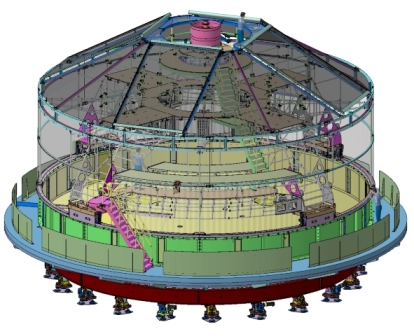
include sketches, photos, ...
To attach figures or files, leave the editor and press the button 'Attach file' at the bottom of the edit window. To insert the image in the text, follow this exemple:

2.2 Definition of the coordinate system
Define the coordinate system $(x,y,z)$ used to identify points on images and probe locations. Think from the beginning at the most rational choice for the final publication of the data, so that no change is needed which may lead to ambiguities in data description. If several coordinate sets need to be used, define precisely their links.
2.3 Relevant fixed parameters:
Define here the parameters which will remain constant during the project, example:
| Notation | Defintion | Value | remarks |
| H | total water height | H=80 cm | ..... |
| W | channel width | L=150 cm | ..... |
| $\alpha$ | slope angle | $\alpha$=20 degrees | ..... |
2.4 Definition of the variable control parameters
The set of these parameter values characterise each experiment.
| Notation | Definition | Unit | remarks |
| Param1 | ... | ||
| Param2 | ... | ||
| Param3 | ... | ||
2.5 Definition of the relevant derived parameters and non-dimensional numbers
Define here the derived parameters of interest, in particular non-dimensional numbers. For instance, for the Reynolds' experiment, the pipe diameter and length, and the fluid viscosity $\nu$ may be the fixed parameters, the pressure drop driving the flow may be the control parameter, while the flow rate $Q$ and velocity $U=Q/\pi r2$ are the derived parameters, and the Reynolds number $Re=Ud/\nu$ the relevant non-dimensional parameter.
3 Instrumentation and data acquisition
3.1 Instruments used
With positions of probes, cameras... For the Coriolis platform you may refer to the description CoriolisInstrumentation.
3.2 Definition of time origin and instrument synchronisation
It is important to properly define the time $t=0$ used to describe phenomena in an experiment. All instruments must be synchronised in time, or at least provide information on the respective measurement timing. Check the consistency of dates and times for all the computers and instruments involved.
3.3 Requested final output and statistics
Defne here the kid of statistics eventually needed.
4 - Methods of calibration and data processing
5 - Organisation of data files
All data related to the project are in Coriolis /.fsnet/project/coriolis/2014/'project name'
- 0_DOC: miscellaneous documentation and reports
- 0_MATLAB_FCT: specific matlab functions
- 0_PHOTOS: photos of set-up
- 0_REF_FILES: files of general use (calibration data, grids ...)
- 0_RESULTS: processed data (time series, statistics...) and figures.
- EXP1, EXP2, folder for each experiment. Structure of each Experiment folder:
- DeviceFolder: corresponding to the data of a given instrument or camera.
- Results from data processing are stored in a folder DeviceFolder.ext where ext is set by the processing program.
- An xml file named DeviceFolder.xml specifies information from the devices, for instance timing and calibration parameters for an image series.
6 - Table of experiments
List of parameter, Param1... , denoted by names defined in section 4.2.
| Name | Date | Param1 | Param2 | Param3 | Remarks |
| #EXP1 | |||||
| #EXP2 | |||||
| #EXP3 | |||||
7 - Diary:
EXP1
EXP2
EXP3
Attachments (2)
- Coriolis_sketch.jpg (113.8 KB) - added by 7 years ago.
- OpenDAP_GM.pdf (189.1 KB) - added by 7 years ago.
Download all attachments as: .zip